

Infrastructure Monitoring System™ (IMS)
MONITOR
Stay aware of every event in real-time.
ANALYZE
Distinguish real threats from background noise.
MANAGE
Resolve, log and report events for compliance.
IMS™ Offers Real-Time Visbility
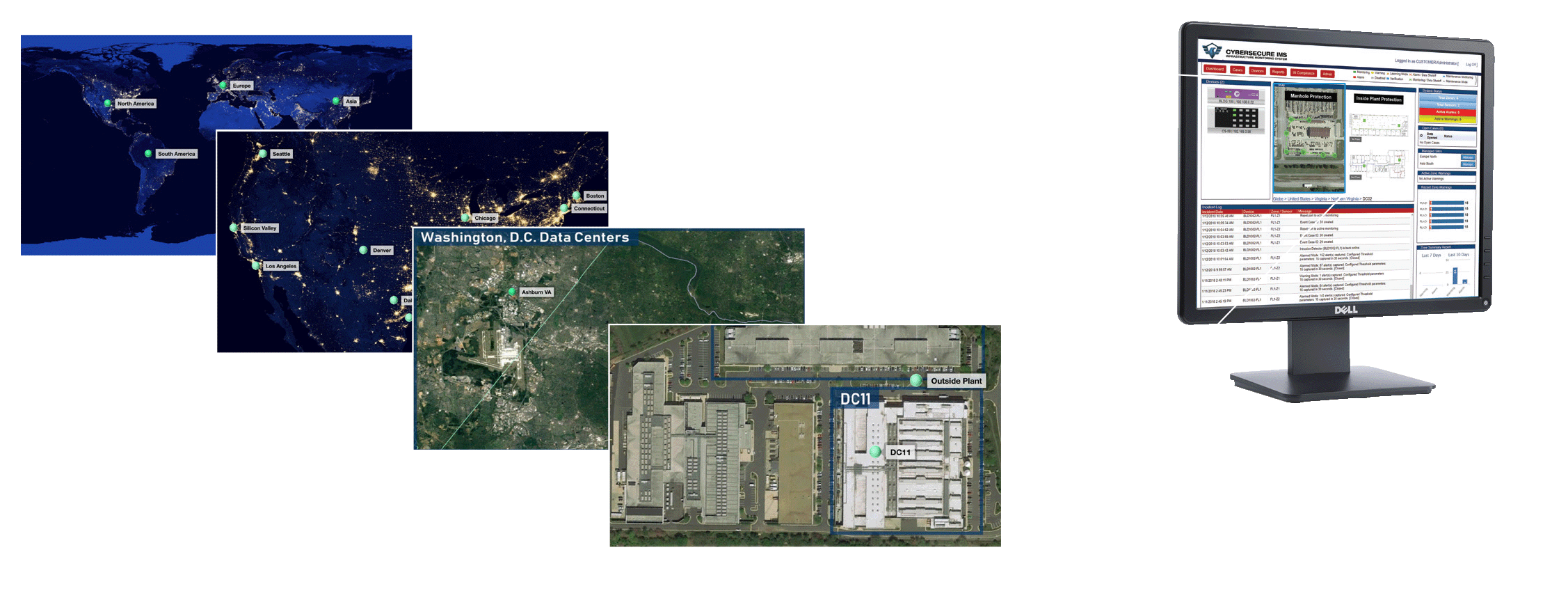
Infrastructure Monitoring System™ (IMS) is the sophisticated software that powers CyberSecure IPS™ hardware like OPTI-GUARD™. It monitors, analyzes, and manages data from various protection systems and displays them in a series of user-friendly, real-time dashboards.
IMS™ Features
OPTICAL INTRUSION WARNING SYSTEM™
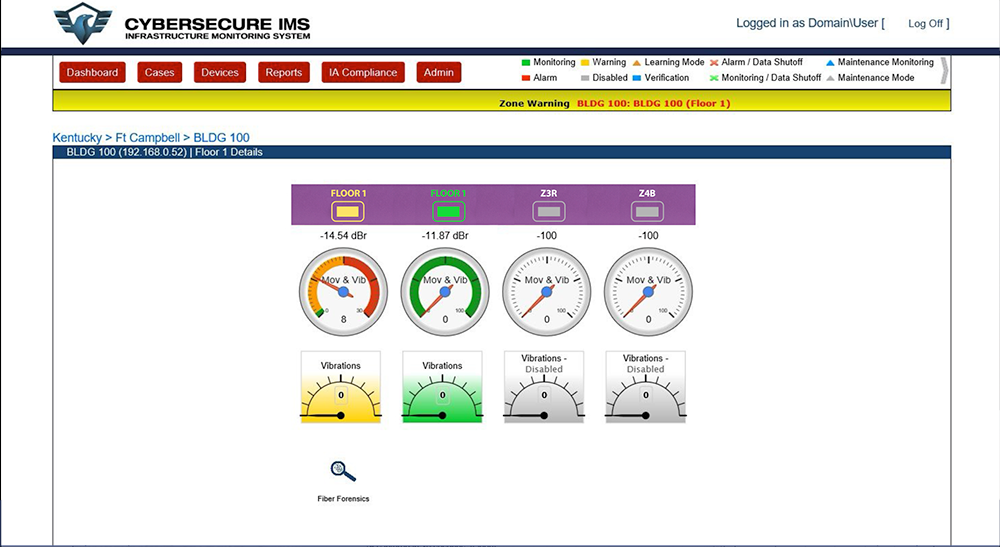
IMS™ replaces antiquated alarm systems with intelligence that only triggers an alarm when the threshold is crossed. Our patented Optical Intrusion Warning System™ gathers information every time an optical disturbance is detected and analyzes the severity of the event. By distinguishing between accidental disturbances and real intrusion attempts, nuisance alarms are reduced by as much as 99%.
INTEGRATED ALARM DISPATCHING™
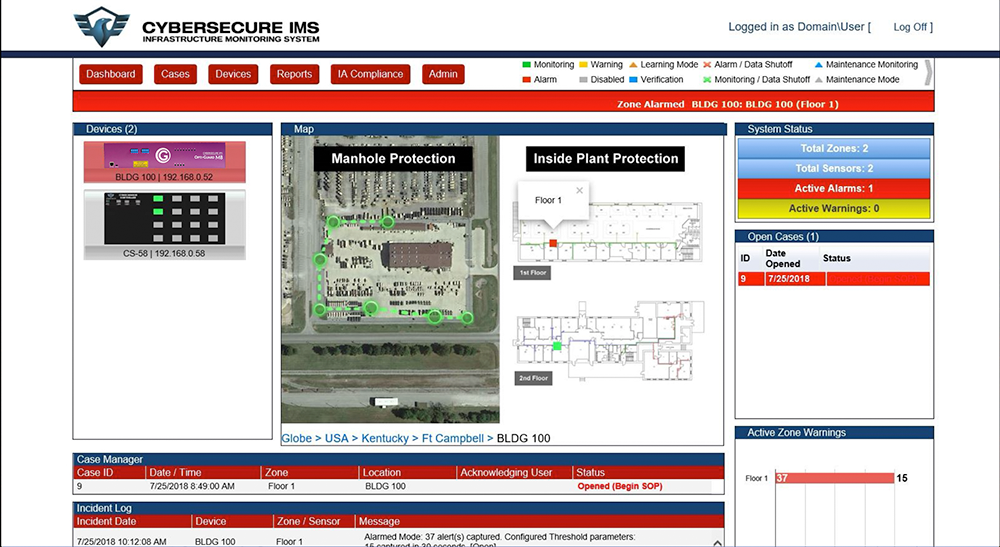
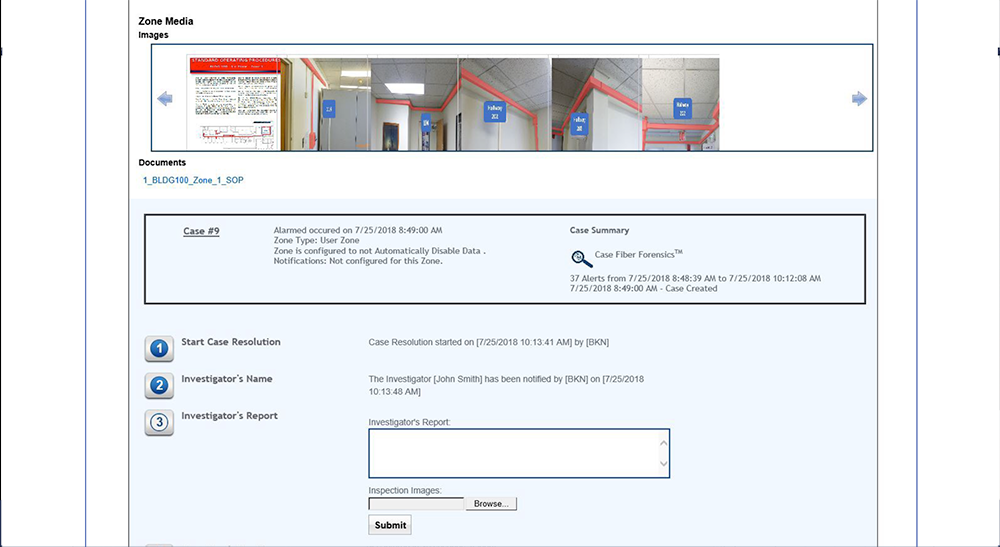
Real-time alerts are displayed on the console and can be sent immediately via email, text, or trigger external dry contact devices. IMS™ includes zone-specific details to help security personnel: Standard Operating Procedures, Special Instructions, Drawings, Images, Video and additional response details such as Points of Contact.
FIBER FORENSICS™
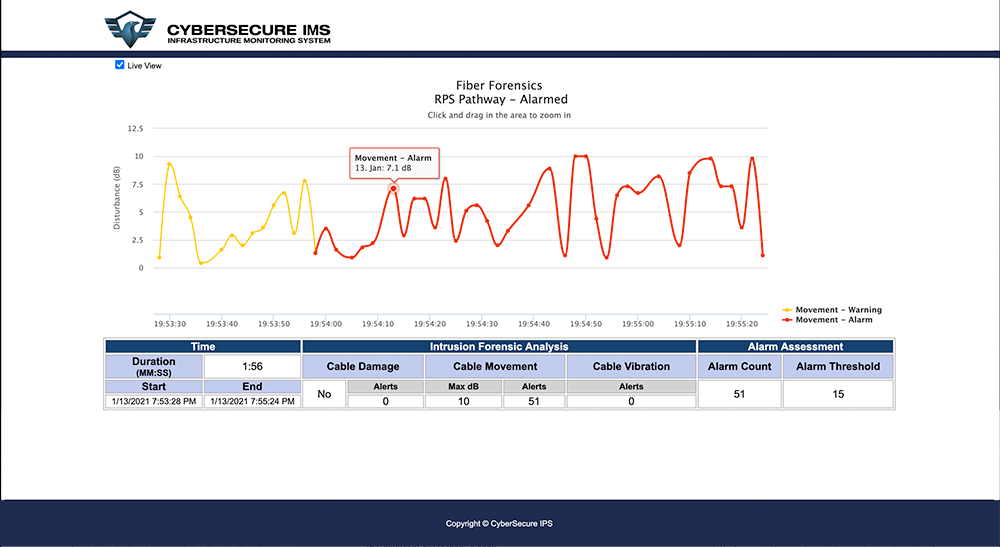
CyberSecure IMS™ contains patented Fiber Forensics™ technology which captures characteristics of real-time intrusion attempts and displays it via the IMS™ user interface. Depending on the severity, optical signatures are tracked to provide valuable intelligence including time stamp, dB loss, number of occurrences, and the duration of the event.
JUST PRESS PLAY™
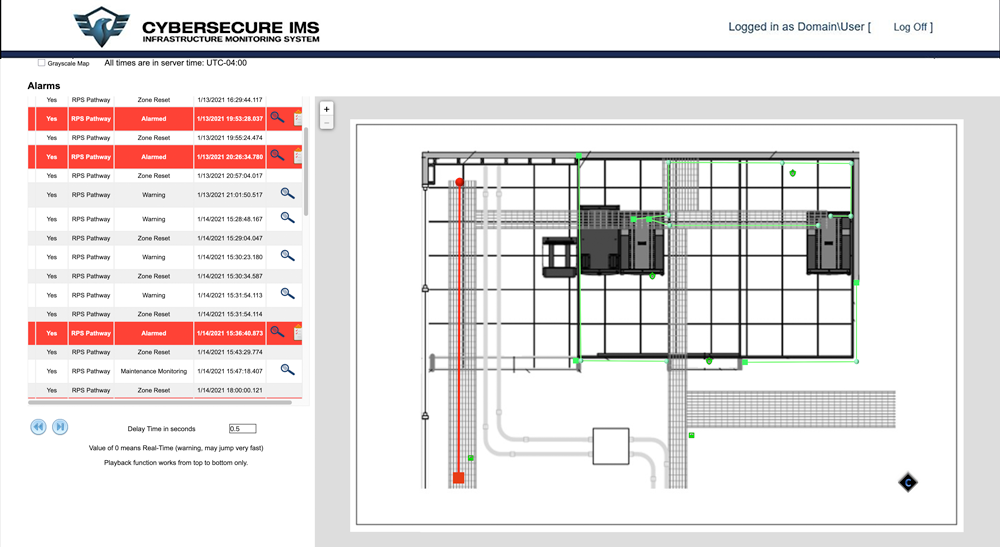
This patented IMS™ feature logs and stores every warning or alarm that is triggered. This rapid troubleshooting feature is akin to having a “DVR-like” capability that significantly reduces the time needed to investigate an outage or incident. Administrators can visit any point in time to play back historical events on the console viewer. If a network outage occurs, this can be an invaluable tool. To prevent similar occurrences in the future, Just Press Play™ can help Administrators determine the underlying cause of the event and ensure that network traffic is restored.
CASE MANAGMENT
IMS™ generates and logs a unique case for every alarm that is triggered. Each case remains open and is kept in an alarmed state until required steps are followed. Recording cases is a key step for compliance but can also be used by administrators to analyze trends in the network and prevent nuisance alarms before they occur. Additionally, health reports for activity occurring in the environment on a zone by zone basis are available daily, weekly, monthly, quarterly and or annually.
IMS™ Benefits
RMF ACCREDITED SOFTWARE
IMS™ was one of the first infrastructure monitoring systems to receive a DOD Certificate of Networthiness. We are proud of that heritage and continue to enjoy Risk Management Framework accreditation at multiple government facilities across the world.
CNSSI 7003 COMPLIANT
Helping customers meet the rigorous requirements of CNSSI 7003 was our primary objective with IMS™. We set out to create an application that makes Information Assurance (IA) compliance simple and stress-free.
SCALABLE ARCHITECTURE
Designed for scale, IMS™ is a robust and dynamic application built for large sensor deployments and complex multi-zone environments. It can easily handle global management of geographically distributed locations simultaneously.
Our legacy equipment did not meet regulatory guidance nor the current environment flexibility. Opti-Guard™ provided compliance as well as laying down the foundation for innovative and flexible SIPR capability to the user.
Air National Guard, Readiness Center Cybersecurity IA Branch
Frequently Asked Questions
Traditional monitoring systems can demonstrate basic monitoring but lack sophistication in determining alarm events. This simplification is great for installation but becomes a nightmare when it comes to responding to a flood of false positive alarms.
IMS™ differs from other systems because it combines robust monitoring with intelligent analysis so that it only alerts when custom thresholds have been met, significantly reducing nuisance alarms. What good are systems if you can’t access information quickly? IMS™ provides dashboards for displaying relevant information in easy to digest modules and includes a zoom feature to drill down to floor plan level details of your infrastructure. When you do have an alarm event, IMS™ can automatically trigger notifications to your response team and provide relevant instructions (including visual aids) that are specific to the location.
Absolutely. IMS™ offers case management which logs every event for compliance but can also be used to analyze trends in the network and prevent nuisance alarms before they occur. Fiber Forensics™ technology captures characteristics of real-time intrusion attempts and depending on the severity, optical signatures are tracked to provide valuable intelligence including time stamp, dB loss, number of occurrences, and the duration of the event. Finally, a patented feature called Just Press Play™ logs and stores every warning or alarm that is triggered. This “DVR-like” capability significantly reduces the time needed to investigate an outage or incident. Administrators can visit any point in time to play back historical events on the console viewer.
When an alarm triggers, IMS™ displays the alarmed port, sensor, and location on-screen, along with step-by-step Standard Operating Procedures (SOPs). IMS™ can be configured to automatically alert a point of contact and connect with other alarm systems via dry contact relays on OPTI-GUARD™. Finally, location specific SOPs help ensure consistent, rapid, and accurate responses for each location — even under pressure.
IMS™ is designed for on-premises or secure-network deployment to meet government and critical infrastructure security requirements.
All OPTI-GUARD™ deployments include onboarding and technical training for IMS™. Customers with a Gold Support license receive 24/7 access to expert assistance, priority hardware replacement, and software updates that expand functionality over time. Active Gold Support license holders are also eligible for up to 4 annual web-based trainings for new employees or as a refresher for your team.